
My Collection: Comic Scanner
HipComicComics
3.2247.00 Reviews
- Version
- 2.1.2
- Installs
- 100.00K
- Age Rating
- Everyone
Screenshots

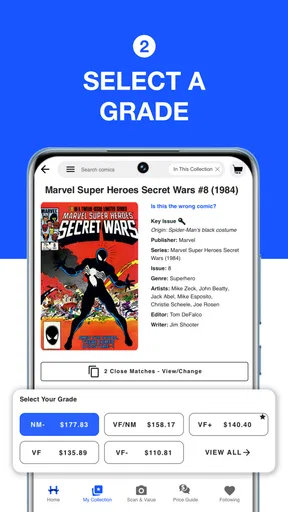
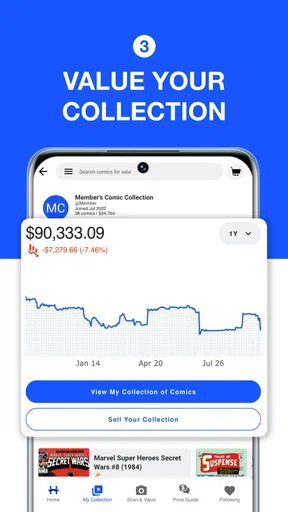
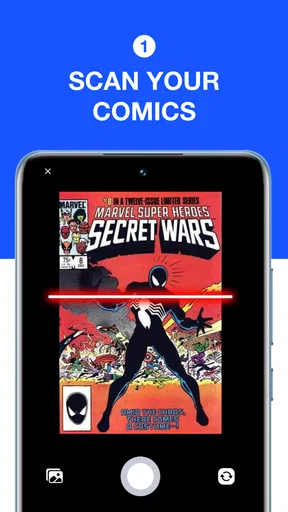
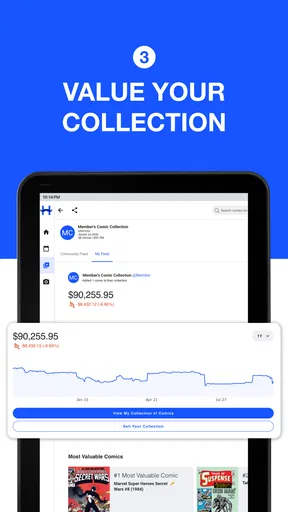

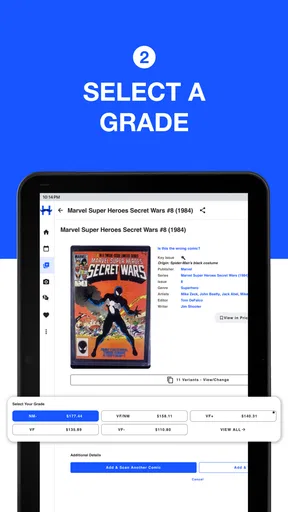
Our Review of My Collection: Comic Scanner
 Analysis by Appyee
My first impression of My Collection: Comic Scanner was that it solves a very specific problem in a pleasantly direct way: turning a comic shelf into a collection I can browse on my phone. It is a free comics app from HipComic, aimed at readers and collectors who want to identify issues by taking photos rather than typing every title, issue number, and variant by hand. That focus gives it an immediate first-week appeal, although the more important question is whether it remains useful once the excitement of scanning a few books has passed.
The app is available to an Everyone audience, runs on Android 8.0 and later, and has reached over one hundred thousand installs. Its current version is 2.1.2, while its average score sits at 3.3 from roughly six hundred ratings. Those figures suggest a product with a real audience but also a mixed experience. I found that fair: the idea is convenient and memorable, but the value depends heavily on how carefully I maintain the collection after the initial setup.
From a quick scan to a collection I can actually use
The strongest part of the experience is the low barrier to getting started. Instead of opening a spreadsheet and creating columns for publisher, series, issue, condition, and purchase notes, I can begin with the camera. That makes the app especially appealing when I have a box of comics in front of me and want to make progress without turning the task into an afternoon of data entry.
I would use it first on a small, clearly organized group rather than photographing an entire long box immediately. A short test batch helps reveal how consistently the camera recognizes covers and whether I need to adjust lighting, distance, or angle. A flat cover with readable lettering is the easiest target. Glossy sleeves, dark rooms, protective bags, unusual layouts, and heavily worn covers are more likely to make the process less smooth.
That is one of the practical details a store summary cannot show: the quality of the result begins before I press the shutter. I get better scans when the comic is placed on a plain surface, the phone is held parallel to the cover, and reflections are kept away from the camera. This is not a flaw unique to the app, but it changes how fast the collection grows. A careless scan can create more correction work than a careful one saves.
The photo-based approach is still much more inviting than manual cataloging for a casual reader. If I inherited a stack from a family member, bought several issues at a convention, or simply want to know what is already on my shelves, the app gives me a reason to begin. The first-week appeal comes from visible progress: each successful scan turns an anonymous comic into something I can revisit digitally.
I also like the psychological difference between cataloging and collecting. A spreadsheet feels like administration. A camera feels like discovery. That distinction matters because most people do not abandon a collection project because they dislike comics; they abandon it because the recording process becomes tedious. My Collection: Comic Scanner reduces that initial resistance, which is its clearest strength.
Who gets the most from the first week
This app suits someone who owns enough comics to need an overview but not necessarily enough to justify specialist inventory software. It is a good fit for a reader who wants a personal record, a newer collector building habits, or someone sorting several piles after a move. It can also help before a duplicate purchase: checking the phone while browsing a shop is more practical than remembering every issue at home.
It is less suitable for a professional dealer who needs a highly controlled inventory workflow from the beginning. A dealer may care about exact editions, grading details, barcode-level precision, pricing history, sales status, and transaction records. A camera-first collection tool may be a useful starting point, but it should not automatically be treated as a complete business database.
The same caution applies to serious collectors of variants. A cover image can help identify a comic, but different printings may look very similar. I would verify the issue details before using the app as the final authority for insurance, resale, or a high-value collection. The convenience is real, but convenience and archival accuracy are not the same thing.
The everyday scenario where it earns its place
Imagine I am preparing to visit a comic shop with a wish list in mind. Before leaving, I can review what I have already recorded instead of opening boxes or relying on memory. At the shop, that quick reference can reduce accidental duplicates and help me decide whether an issue fills a gap. Later, after bringing new comics home, I can add them while the purchase is still fresh in my mind.
Another useful situation is reorganizing a shelf by series. I can work through one section at a time, scan the covers, and use the resulting collection as a digital checkpoint. If I stop halfway, I still have a record of the completed section rather than an unfinished spreadsheet that is difficult to interpret. The app is most helpful when it supports a real decision, such as buying, sorting, checking duplicates, or remembering what I own.
What remains useful after the novelty fades
The first month is where the app has to prove itself. Once the obvious comics have been photographed, the recurring value comes from returning to the collection before buying more, adding new arrivals, and correcting mistakes. If I make those actions part of my normal comic routine, the app can become a practical reference rather than a one-time scanning experiment.
My preferred habit would be small and regular: scan new purchases soon after unpacking them, then review the collection before visiting a store or placing an order. That is more sustainable than trying to catalog hundreds of comics in one session. The app’s camera-led design encourages this rhythm because each new item feels like a short task rather than a major project.
There is also value in using the collection as a memory aid. Comic shelves are easy to underestimate, especially when series are split between rooms, boxes, and reading piles. A digital record can answer simple questions that otherwise lead to repeated searching: do I already own this issue, did I finish this run, or which part of a series should I look for next? Those questions are not glamorous, but they are where a collection app earns repeated attention.
One of my more useful habits would be scanning by meaningful groups instead of random order. I might complete a single series, a publisher section, or a box at a time. Grouping the work makes gaps easier to notice and makes future maintenance less confusing. If I scan randomly, the collection may grow, but it becomes harder to know which shelves still need attention.
I would also keep the physical arrangement and digital habit connected. After scanning a box, I could return the comics in a consistent order and treat that box as finished. This reduces the risk of repeatedly photographing the same issues while other parts of the collection remain invisible. The app cannot create organization by itself; it works best when I pair it with a simple physical system.
The developer, HipComic, has positioned the product around a clear collector need rather than trying to make it a general comics reader. That narrow purpose is a benefit for users who want inventory help, but it also limits the reasons to open the app. I would not expect it to replace a reading app, a marketplace account, or a detailed valuation service. Its lasting role is as a personal collection companion.
Maintenance is the real test
Every collection tool creates a maintenance obligation. The easier it is to add an item, the more tempting it is to postpone checking whether the entry is correct. I would review scans immediately when something looks ambiguous, because forgotten corrections become difficult to untangle later. A quick confirmation at the time of entry is less frustrating than reconstructing the purchase months afterward.
The biggest maintenance trade-off is speed versus precision. Photographing a cover is faster than typing, but a fast capture may need attention if the image is unclear or the issue resembles another edition. For ordinary reading copies, that compromise may be perfectly acceptable. For rare, signed, graded, or valuable comics, I would slow down and verify every important detail outside the quick-scan mindset.
There is another subtle burden: a collection is only as current as its last update. If I stop recording purchases, the app gradually becomes less trustworthy. That can be worse than having no list at all because an incomplete list may create false confidence. I would therefore use it as a living checklist, not as a one-time declaration that the collection is finished.
People who dislike repetitive organization should think carefully before starting. The first scans may feel rewarding, but maintaining a large library means repeating the same basic action whenever new comics arrive. The app reduces friction; it does not eliminate the responsibility to keep the record accurate.
Where fatigue starts to appear
My main source of fatigue would be the gap between recognizing a cover and confidently cataloging an exact comic. A familiar superhero image may be easy to identify, while a less distinctive issue, alternate cover, or damaged copy can require a second look. Repeatedly correcting uncertain entries could weaken the very convenience that attracted me.
Another potential frustration is scale. A small personal collection feels manageable, but a large backlog changes the experience from quick discovery to sustained clerical work. Even if each scan is simple, hundreds of scans demand patience. I would not begin with the expectation that the app will instantly make a chaotic collection perfectly organized.
Camera conditions can add friction too. Low light, reflections from bags, bent covers, and crowded backgrounds all make scanning less comfortable. My practical solution would be to create a small scanning spot with steady light and enough room to place one comic flat. That preparation sounds minor, but it turns an awkward process into a repeatable one.
The rating of 3.3 reflects why expectations should stay realistic. I see this as a focused convenience app, not a flawless professional cataloging system. If a user expects every comic to be identified perfectly with no checking, disappointment is likely. If the expectation is a faster starting point for a personal inventory, the experience makes more sense.
How it compares with familiar alternatives
The obvious alternative is a notes app or spreadsheet. Those tools offer more control over columns, comments, condition, purchase source, and personal labels, but they require much more work at the beginning. My Collection: Comic Scanner wins when I want to capture the basic existence of a comic quickly. A spreadsheet wins when I need a tailored record and do not mind entering information manually.
A general barcode or inventory app may be better for mixed household possessions, but it is unlikely to feel as natural for someone working through comic covers. On the other hand, a dedicated collector database may be stronger for edition details, pricing research, and sales management. I would choose the dedicated database when precision and commercial records matter more than a quick personal overview.
There is also the simplest alternative: photographing shelves without creating a catalog. Shelf photos are fast and useful as visual reminders, but searching them later is awkward. The app offers a more structured way to turn those comics into a usable list. The trade-off is that a photo archive demands less maintenance, while a catalog becomes more useful only when I keep it current.
For readers who mainly want to read digital comics, none of these collection advantages may matter. This is not the right choice if the main goal is discovering stories, managing reading progress, or replacing a digital comics library. Its value begins with physical ownership and the desire to remember, sort, or check that ownership.
Does it deserve permanent space?
After the novelty fades, I think the app earns lasting space for collectors who make it part of a purchase routine. The winning pattern is simple: scan new comics, check the collection before buying, and occasionally work through one unrecorded box. That creates recurring value without demanding a large weekly project.
I would skip it if I own only a handful of comics, never buy duplicates, or already maintain a detailed catalog that I trust. In those cases, the camera workflow may not save enough effort to justify another place to manage information. I would also be cautious if I need professional-grade records for valuation, insurance, or selling, where manual verification and richer fields are more important than speed.
For everyone else, the free price makes experimentation easy. I would start with a small, representative batch rather than committing the whole collection immediately. Test ordinary issues, glossy covers, older comics, and anything that looks like a variant. That trial reveals whether the recognition and correction process suits my shelves before I invest serious time.
My final opinion is positive but measured. My Collection: Comic Scanner is not valuable because it makes a dramatic promise; it is valuable when it removes enough friction from a repeated collector task. HipComic has built a focused comics app that can turn a camera into a useful starting point for personal organization. It becomes a keeper only when I treat scanning as a habit, verify important entries, and accept that a convenient inventory still needs care.
In short, I would recommend it to a friend who keeps physical comics and wants a less intimidating way to begin tracking them. I would describe it as a practical first layer, not the final answer for every kind of collector. The lasting benefit comes from the routine around the app, not from the first burst of scans. Used that way, it has a clear place on my phone; used once and forgotten, it quickly becomes another unfinished organization project.
Privacy and Permissions
See what permissions an app requests and how it handles your data.
- Location
- approximate location (network-based), precise location (GPS and network-based)
- Photos/Media/Files
- read the contents of your USB storage, modify or delete the contents of your USB storage
- Storage
- read the contents of your USB storage, modify or delete the contents of your USB storage
- Camera
- take pictures and videos
- Microphone
- record audio
- Other
- view network connections, full network access, change your audio settings, run at startup, prevent device from sleeping, read Google service configuration
Verdict
Strengths of My Collection: Comic Scanner
- Quickly scans comic covers and identifies many popular issues.
- Helps organize a personal comic library in one convenient place.
- Useful search tools make finding entries faster.
- Supports tracking owned comics and collection gaps.
- Clean interface is easy for new users to understand.
Limitations of My Collection: Comic Scanner
- Recognition may fail with damaged, rare, or poorly lit covers.
- Some catalog details may be incomplete or inaccurate.
- Advanced collection features may require an account or subscription.
- Large libraries can take time to scan and organize.
- The app may depend on an internet connection for lookups.
Similar Picks in This Category
View All
WEBTOON: Manga, Comics, Manhwa
NAVER WEBTOON4.6

MangaToon: Comic & Manga
MangaToon4.3

네이버 웹툰 - Naver Webtoon
NAVER WEBTOON4.3

Tapas – Comics and Novels
Tapas Entertainment Inc.4.2

Lezhin Comics - Daily Releases
LEZHIN ENTERTAINMENT3.3

WebComics - Webtoon & Manga
WEBCOMICS HOLDINGS HK LIMITED4.4
Frequently Asked Questions
What is My Collection: Comic Scanner, and what can I use it for?
My Collection: Comic Scanner is a mobile app designed to help comic book readers organize and manage their personal collections. It can be used to record individual issues, review collection details, and keep track of books you own. Depending on the available catalog and scanning support, it may also help identify comics more quickly than entering every title manually.
How does the comic book scanning feature work?
The scanner generally uses your device’s camera to read a comic’s barcode or visual information and then searches for a matching entry in its database. For the best results, use good lighting, keep the camera steady, and make sure the barcode is not damaged or covered. Older, rare, international, or variant issues may not scan correctly and could require manual entry.
Does My Collection: Comic Scanner require an internet connection?
An internet connection is usually needed when scanning comics, searching the app’s catalog, downloading cover images, or synchronizing collection information. Some previously saved collection data may remain accessible offline, but online features can be limited without connectivity. Users should also check whether mobile data is being used, especially when browsing many covers or updating a large collection.
Can I manually add comics that the scanner cannot recognize?
Yes, manual entry is important because no comic database can identify every issue perfectly. If a barcode is missing, damaged, unreadable, or not included in the catalog, you can normally add the comic by entering information such as the title, issue number, publisher, release details, and condition. Reviewing the saved record afterward helps prevent duplicate or inaccurate entries.
Is My Collection: Comic Scanner free, and are there any privacy concerns?
The app’s download model, advertising, and premium features may vary by platform and version, so users should review the current Google Play or App Store listing before installing. Because the app may use the camera for scanning and possibly online accounts or cloud synchronization, check its permission requests and privacy policy. Only grant access that matches the features you intend to use.
